
Grid 3

Use Join-In Pro together with Grid 3 to access mainstream apps while continuing to communicate with your familiar AAC system. Whether you use text-based or symbol-based communication, Join-In Pro integrates with Grid 3 to support messaging, searching, writing, browsing, AI tools, and more — using the access method and communication system you already know. […]
TD Control
Join-In Pro works with TD Control, allowing you to access supported apps and websites using the same eye gaze controls you use for communication. Before You Start (One-Time Setup) Before using Join-In Pro with TD Control, you need to enable Repeat Click mode. This only needs to be done once. Open the TD Control Dashboard […]
ALEA Intelligaze

Before using Join-In Pro with Alea IntelliGaze, you will need to adjust a few settings in both IntelliGaze and Join-In Pro. Configure the Join-In Pro Application Profile IntelliGaze allows application-specific profiles, enabling different settings to be used for different programs. Join-In Pro includes its own application profile, allowing IntelliGaze to be optimized specifically for Join-In […]
Communicator 5
Communicator 5 users can open Join-In Pro apps directly from their communication pages and move between their Communicator 5 page set and Join-In Pro. Users can: Send messages, posts, and comments composed with their Communicator 5 keyboard to supported Join-In Pro apps, including WhatsApp, Facebook, Instagram, Gmail, and more. Use Communicator 5 to enter search […]
TD Snap
Use your familiar TD Snap communication system while participating in everyday digital activities. Join-In Pro integrates with TD Snap, allowing users to move between their AAC system and Join-In Pro supported apps. Users can: Send messages created in TD Snap through apps such as WhatsApp, Facebook, Instagram, Gmail, and more. Use TD Snap to search […]
Standalone
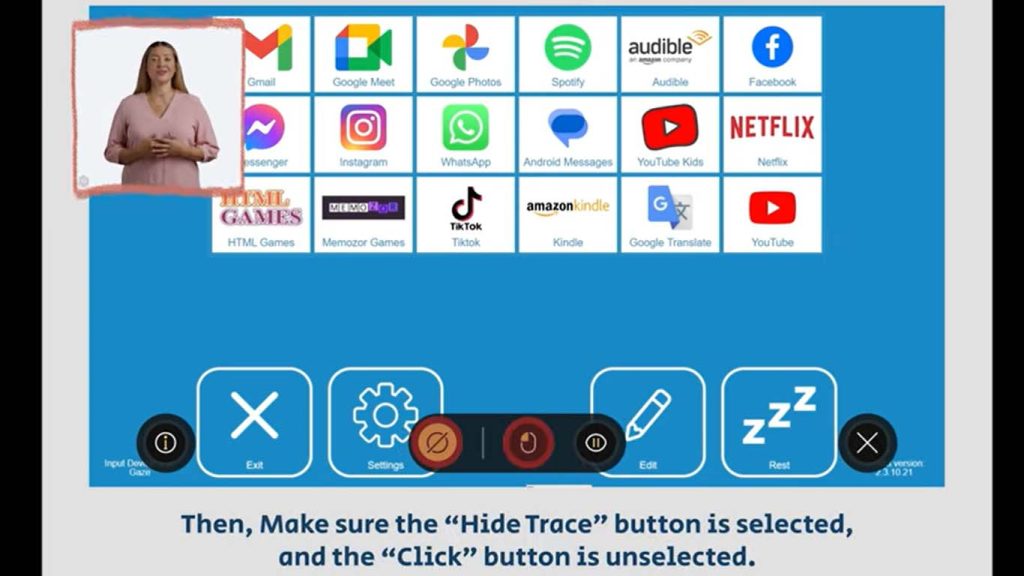
After installing Join-In Pro: Initial Setup: Double-click the Join-In Pro shortcut on your desktop. Follow the instructions on the screen. Eye Gaze, Touch, Pointer, or Mouse users: click the Join-In Pro shortcut to control the program directly. When using eye gaze, or a pointer, it is recommended to use it in a mode with no […]
Communicator 5 with Join-In (older version)
After installing Join-In (the older version) for Communicator 5: If this is the first time you are using Join-In on your device, open Communicator 5 and go to Edit home page, Add page sets, Text communication, Add-on products and add the page sets you would like to use. Note – for many of the apps you will find a regular […]
Join-In (older version) with Grid 3
After installing Join-In (older version) for Grid 3: Your 30-day free trial will start automatically. After the trial is over, you will need to login with your subscription details, or to enter a license key. If you have a license code – search for and open the Join-In license manager on your device, enter the […]
